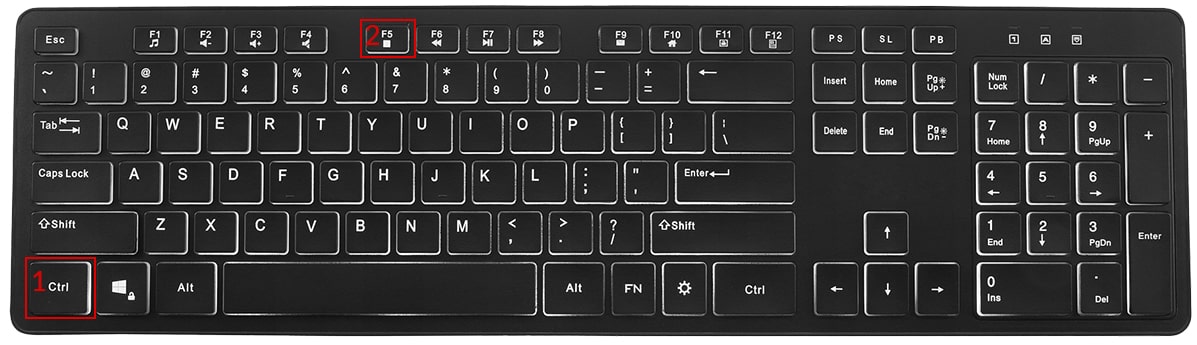
Hold down the key Ctrl, then press the key F5Repeat this action at least 3 times
If this option does not work, try:
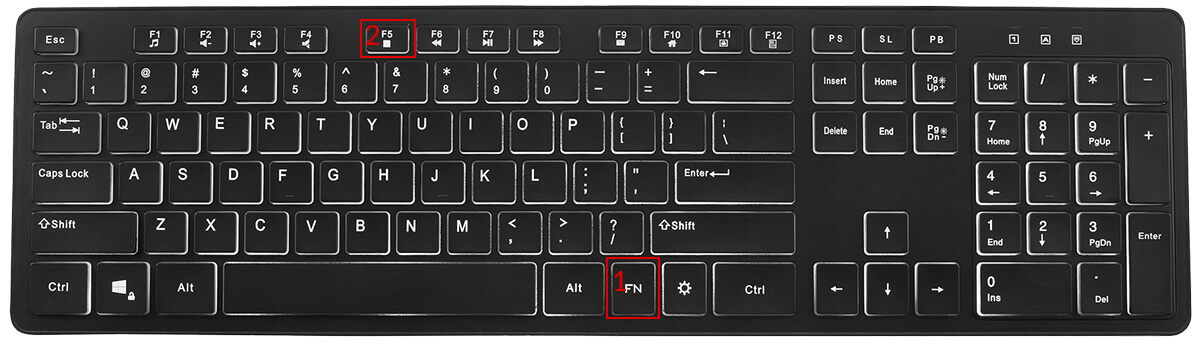
Hold down the key Fn, then press the key F5 Repeat this action at least 3 times
IN THE OPERATING SYSTEM:
For the Safari browser:
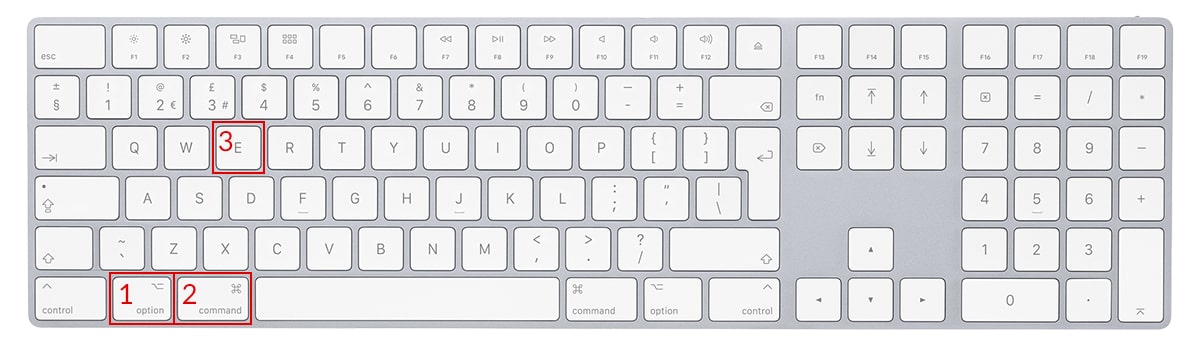
Hold down the key Option + Cmd(Command), then press the key ERepeat this action at least 3 times
For the Chrome, Firefox, Opera, Edge browser:
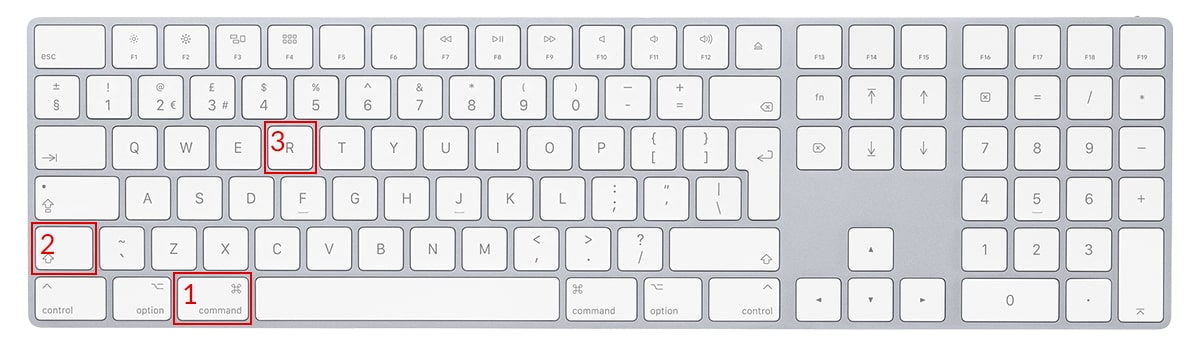
Hold down the key Cmd(Command) + Shift, then press the key RRepeat this action at least 3 times
Submit a suggestion
Warning
Please turn off Caps Lock to write and send a suggestion.
Debit note
With Afaktury.pl, you can issue a debit note in just a few moments. In specific situations it may constitute an accounting document under the Accounting Act. This is a very simple form, so any entrepreneur can issue the note independently, without an accountant.
When can a debit note be prepared?
An accounting note may document transactions that are not subject to VAT regulations and cannot be recorded using an invoice or bill. In dealings with contractors, it can be used to charge a debtor for late payment of an invoice or impose a penalty for failure to comply with an agreement. It may also be justified when an employer charges an employee for damage or shortages. Public-finance-sector organizational units may also settle accounts with one another using debit notes. The document can also correct other debit notes, but it should not be confused with a corrective invoice.
How do you issue a debit note?
The law does not provide a detailed list of items that a debit note must contain. General guidelines should therefore be followed, according to which an accounting document should include:
the document type, in this case the name “Debit note”,
an identification number,
a description of the financial transaction,
identification of both parties by their names and addresses,
the transaction value,
the issue date and, if different, the transaction date.
Discover the features of Afaktury.pl
Afaktury.pl accounting software lets you issue debit notes quickly, conveniently and securely. The electronic form contains all items required by law and can be expanded with additional content. After signing in, choose “Issue document” from the main menu and then “Debit note”.
You receive an automatically suggested identification number, which can easily be adapted to your preferences. Click the gear icon and select one of the numbering formats. Next, specify the dates to appear on the accounting note: the issue date, completion date and sale/service date. The calendar view makes this easier. You can also enter the place of issue and tell the contractor which order or agreement number the debit note concerns.
The online form can retrieve contractor details directly from the GUS register. Enter the tax identification number and the remaining information will be completed automatically. You can also save and load customer data and product names, for example from a selected warehouse. Click “Show additional data” to display fields such as REGON, website address or KRS number. You can also specify persons authorized to prepare and receive the accounting note.
The note can specify the payment method and final payment deadline. After receiving payment, you can return to the saved document and mark the amount as settled. Afaktury.pl also supports recurring debit notes.
Automatic calculation of numerical values
Have you ever made mistakes when calculating tax amounts and prices on accounting documents? When issuing an accounting note in Afaktury.pl, you avoid this risk because all values are calculated automatically.
Additional options for preparing accounting notes
Our accounting software is highly flexible, so debit notes can be expanded with many different items. You can design any footer and header, add comments for the contractor or provide additional information. You can also attach files in any format and simultaneously create another document, such as a bill, receipt, invoice, pro forma invoice, commercial offer, corrective note or complaint.
Try Afaktury.pl free of charge
Do you want to verify the capabilities of the accounting software before paying a subscription? Use the 30-day trial period with full access to all Afaktury.pl features. See how quickly, easily and conveniently you can issue debit notes and other accounting documents. Every document can also be recorded and searched on an ongoing basis using selected criteria.
Debit note — PDF printout
Attention!
You are currently editing this document.
All changes made will apply only to this document.
To issue a new document with similar data, click "Issue similar"
Changing calculations to use the gross price changes how document amounts are calculated and may produce incorrect results if the invoice was created from the net price!
The columns in the table correspond to successive fields in the Standard Audit File for Tax according to the specification published on the website of the Ministry of Finance. Field names and descriptions from the specification:
LpSprzedazy - Row number in the VAT sales register
NrKontrahenta - Number used to identify the customer for tax or value added tax purposes
NazwaKontrahenta - Customer's full name or company name, Adres Kontrahenta - Customer address
DowodSprzedazy - Sales document number
DataWystawienia - Sales document issue date
DataSprzedazy - Sale date, if specified and different from the sales document issue date. Otherwise - empty field
K_10 - Net amount - Supply of goods and provision of services within the country, exempt from tax
K_11 - Net amount - Supply of goods and provision of services outside the country
K_12 - Net amount - including provision of services referred to in Article 100(1)(4) of the Act
K_13 - Net amount - Supply of goods and provision of services within the country, taxed at 0%
K_14 - Net amount - including the supply of goods referred to in Article 129 of the Act
K_15 - Net amount - Supply of goods and provision of services within the country, taxed at 5%
K_16 - Output tax amount - Supply of goods and provision of services within the country, taxed at 5%
K_17 - Net amount - Supply of goods and provision of services within the country, taxed at 7% or 8%
K_18 - Output tax amount - Supply of goods and provision of services within the country, taxed at 7% or 8%
K_19 - Net amount - Supply of goods and provision of services within the country, taxed at 22% or 23%
K_20 - Output tax amount - Supply of goods and provision of services within the country, taxed at 22% or 23%
K_21 - Net amount - Intra-Community supply of goods
K_22 - Net amount - Export of goods
K_23 - Net amount - Intra-Community acquisition of goods
K_24 - Output tax amount - Intra-Community acquisition of goods
K_25 - Net amount - Import of goods settled in accordance with Article 33a of the Act
K_26 - Output tax amount - Import of goods settled in accordance with Article 33a of the Act
K_27 - Net amount - Import of services, excluding services purchased from value added tax taxpayers to which Article 28b of the Act applies
K_28 - Output tax amount - Import of services, excluding services purchased from value added tax taxpayers to which Article 28b of the Act applies
K_29 - Net amount - Import of services purchased from value added tax taxpayers to which Article 28b of the Act applies
K_30 - Output tax amount - Import of services purchased from value added tax taxpayers to which Article 28b of the Act applies
K_31 - Net amount - Supply of goods and provision of services for which the buyer is the taxpayer under Article 17(1)(7) or (8) of the Act (completed by the supplier)
K_32 - Net amount - Supply of goods for which the buyer is the taxpayer under Article 17(1)(5) of the Act (completed by the buyer)
K_33 - Output tax amount - Supply of goods for which the buyer is the taxpayer under Article 17(1)(5) of the Act (completed by the buyer)
K_34 - Net amount - Supply of goods and provision of services for which the buyer is the taxpayer under Article 17(1)(7) or (8) of the Act (completed by the buyer)
K_35 - Output tax amount - Supply of goods and provision of services for which the buyer is the taxpayer under Article 17(1)(7) or (8) of the Act (completed by the buyer)
K_36 - Output tax amount on goods and services included in the physical inventory referred to in Article 14(5) of the Act
K_37 - Return of the deducted or refunded amount spent on purchasing cash registers, as referred to in Article 111(6) of the Act
K_38 - Output tax amount on the Intra-Community acquisition of means of transport, reported in field K_24, payable by the deadline referred to in Article 103(3), in conjunction with paragraph 4 of the Act
K_39 - Tax amount on the Intra-Community acquisition of motor fuels, payable by the deadlines referred to in Article 103(5a) and (5b) of the Act
Select the appropriate parameter for the item:
GTU_01 - alcoholic beverages
GTU_02 - fuels
GTU_03 - heating oils and lubricating oils
GTU_04 - tobacco products
GTU_05 - waste
GTU_06 - electronic devices and their parts and materials
GTU_07 - vehicles and automotive parts
GTU_08 - precious and base metals
GTU_09 - medicines and medical devices
GTU_10 - buildings, structures and land
GTU_11 - trading in greenhouse gas emission allowances
GTU_12 - intangible services, including marketing and advertising services
GTU_13 - transport and warehousing services
Option available with a Prestige account
This option is available only with a Prestige account.
To add this option to your account, go to Extend account validity and order a Prestige account, or call us at: 601 131 900.
Feature available with a paid subscription
To use this feature, purchase a paid subscription: Standard, Prestige or Prestige + P.
Limit exceeded
The printing/sending limit for this account has been exceeded. You can create PDFs for 10 documents per month (printing/sending).
To print and send documents without limits, purchase a paid subscription: Standard, Prestige or Prestige + P.
Limit exceeded
The document saving limit for this account has been exceeded. A free account allows only 3 documents per month and 1 document edit.
To save documents without limits, purchase a paid subscription: Standard, Prestige or Prestige + P.
Change document number
The next available document number in the selected month is:
Document number:
Attention!
You are changing the document status to Archived
Archived documents cannot be edited or have their status changed. Changing the status to Archived cannot be undone.
Do you want to continue?
Kaucja, kod CN, dokumenty kasowe i KSeF - co zmieniliśmy Ostatni rok przyniósł przedsiębiorcom sporo zmian. W październiku 2025 r. ruszył system kaucyjny, a w 2026 r. KSeF stał się obowiązkowy. Wiele firm, które do tej pory wystawiały...
Internal service error, code E01. Please contact technical support.
The most common cause of this error is a lost internet connection. Refresh the current webpage.
If the problem persists, contact us.
The action was completed successfully.
You are not the owner of this item.
Invalid data: incorrect Tax ID or account number
You do not have permission to perform this action.
This field cannot be empty.
No results.
The verification code is incorrect
Internal service error, code E04. Please contact technical support.
The form could not be sent. Check that all required fields have been completed