IN THE OPERATING SYSTEM:

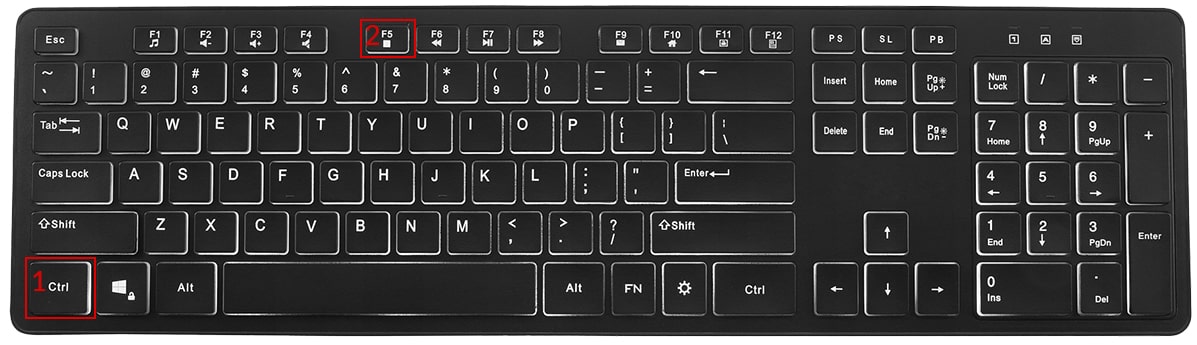
Hold down the key Ctrl, then press the key F5 Repeat this action at least 3 times
If this option does not work, try:
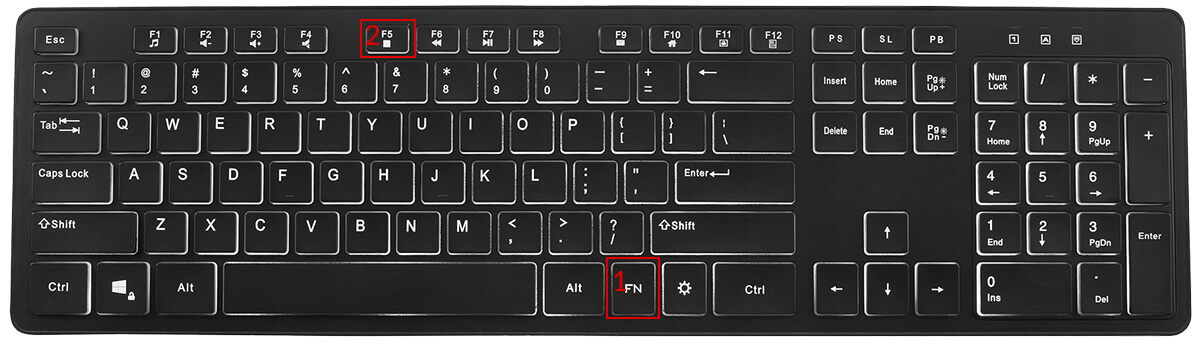
Hold down the key Fn, then press the key F5
Repeat this action at least 3 times
IN THE OPERATING SYSTEM:

For the Safari browser:
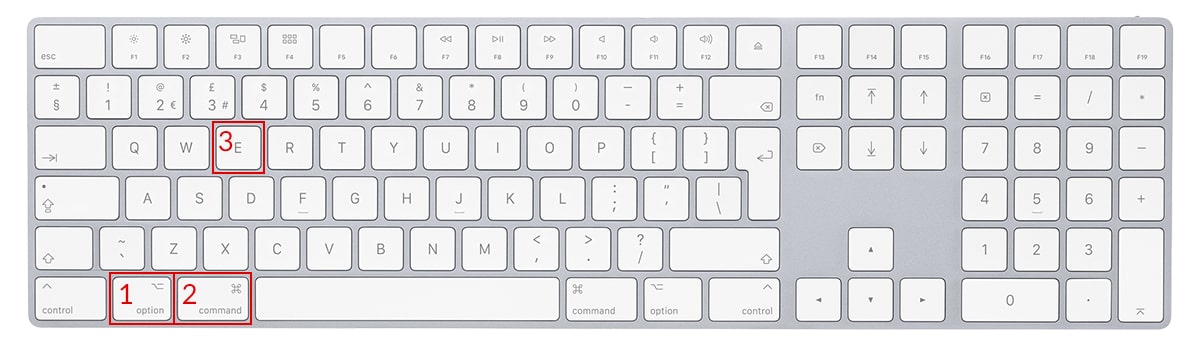
Hold down the key Option + Cmd(Command), then press the key E Repeat this action at least 3 times
For the Chrome, Firefox, Opera, Edge browser:
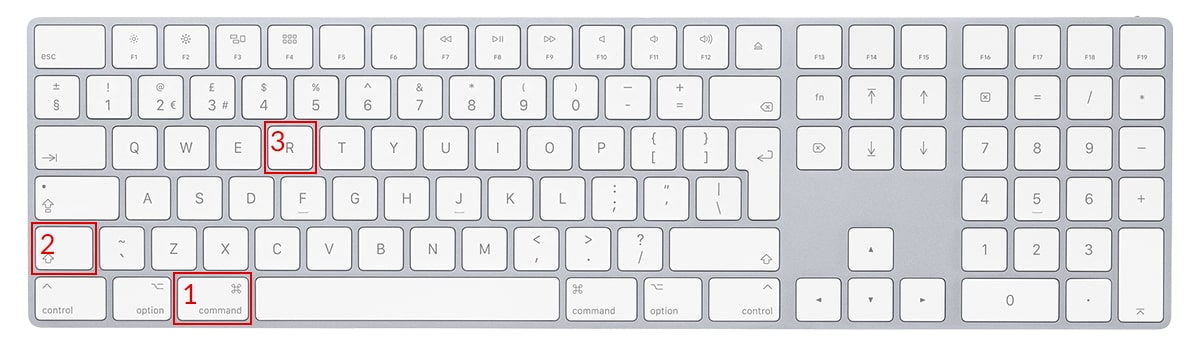
Hold down the key Cmd(Command) + Shift, then press the key R Repeat this action at least 3 times
The afaktury.pl system does not send any text messages concerning subscription payments. If you have received such a message, ignore it or report it to the appropriate authorities. It may be an attempt to extort money by people impersonating our service. You should exercise great caution. If in doubt, you can contact us.
An afaktury.pl account is secured with a password and login. The login must be unique and must not be disclosed to third parties. The password must also be kept secure. The system requires a password of at least 12 characters, including uppercase letters, digits, and special characters. For security reasons, the password should be changed from time to time.
For security reasons, the system notifies you when someone logs in from a new device. The message is automatically sent to the email address provided during registration. This is a system email and cannot be disabled. If an unauthorized person has logged in, immediately change the password for your afaktury.pl account.
You can change or edit your login, password, and email address by opening “Account management” in the upper-right corner. After opening the management section, a table will appear. Click your login, displayed in blue in the login/edit column. Confirm the updated details by clicking “Save changes”.
If you do not remember your password, click “Forgot password” on the login screen and then enter your login. You will receive an email containing a link to change your password. Simply enter the new password twice and then log in. If you do not remember your login either, contact us using the telephone number available on the contact page. After you provide the details requested by the consultant, you will be given information about your login. If incorrect details are entered three times, the system will block login attempts and display an Undefined message. In this case, you should also contact us by telephone.
The afaktury.pl system does not allow you to permanently delete an account or saved documents. With an active subscription, documents and company details (except for the tax identification number) can be edited. However, an unused account does not incur any charges. You can stop using the program at any time without worrying about costs.
Every user of the afaktury.pl invoicing program can issue up to 3 documents per month free of charge. This is an ideal option to get started, especially for people running a small business or working as freelancers. You do not need to provide card details or choose a paid plan. Only after exceeding the limit do you decide whether and when to purchase access to additional features.
Afaktury.pl supports more than 30 types of financial documents. You can issue, among others, VAT invoices, non-VAT invoices, margin invoices, advance and final invoices, pro forma invoices, corrections, bills, receipts, accounting notes, RR invoices, recurring invoices, invoices for receipts, quotations, orders, cash-in/cash-out documents, and many more. The program is a comprehensive tool for managing sales and company documentation.
Yes. The program is fully integrated with the National e-Invoice System (KSeF), which means that documents can be issued in compliance with current regulations and automatically submitted to the Ministry of Finance system. Afaktury.pl also supports downloading an Official Confirmation of Receipt (UPO) and enables full validation of invoices before submission.
After the 30-day free trial ends, you do not lose access to your account or issued documents. You can switch to the free plan and continue issuing up to 3 documents per month. You can also choose a paid plan with additional features at any time, depending on your company's needs.
Yes. Afaktury.pl allows invoicing in many currencies (including EUR, USD, GBP, and CHF) using National Bank of Poland exchange rates (and other rates), and offers invoice translations into 31 languages, including English, German, French, Russian, Dutch, and others. This is an excellent option for companies serving foreign customers or conducting international sales.
Documents issued in afaktury.pl are stored securely in your account for as long as it remains active, meeting statutory requirements and allowing invoices to be archived for at least 5 years in accordance with tax law. You can therefore be sure that your accounting records will be available whenever you need them.
Yes, very secure. The program uses the latest security technologies; data is encrypted, regularly backed up, and protected against unauthorized access. The servers are located in secure data centers that comply with GDPR requirements. Your data and documents are completely secure with us.
No. Afaktury.pl operates entirely online; all you need is a web browser. The invoicing program is available on computers, laptops, tablets, and smartphones, and its interface is fully responsive, which means it adapts to every screen.
Yes. The invoicing program allows you to issue both bills (for businesses not registered for VAT) and electronic receipts (as sales documents without a tax identification number). This is particularly useful for small businesses, craftspeople, and service providers who are not required to use a cash register.
Yes. Afaktury.pl allows you to import customers and data from other programs. You can also add invoices to the archive manually or use technical support, which will assist you with the data migration process. For a large number of documents, we recommend contacting the support team.
Yes. This invoicing program runs smoothly on all devices: computers, tablets, and smartphones using Android and iOS. You can issue an invoice even while traveling or meeting a customer; all you need is internet access.
Yes. Afaktury.pl allows you to personalize invoices by adding your company logo, product images, and a scan of a stamp, logo, or signature. This makes your invoices look professional and helps build your brand image.
Of course. You have full control over document numbering: you can set your own numbering scheme (for example, including the company name, year, and series number) and edit document series according to the invoice type or company department.
Yes. You can create subaccounts for employees, accountants, or other company departments and assign appropriate permissions to them. This allows the entire team to work in one program simultaneously and securely while maintaining control over documents.