IN THE OPERATING SYSTEM:

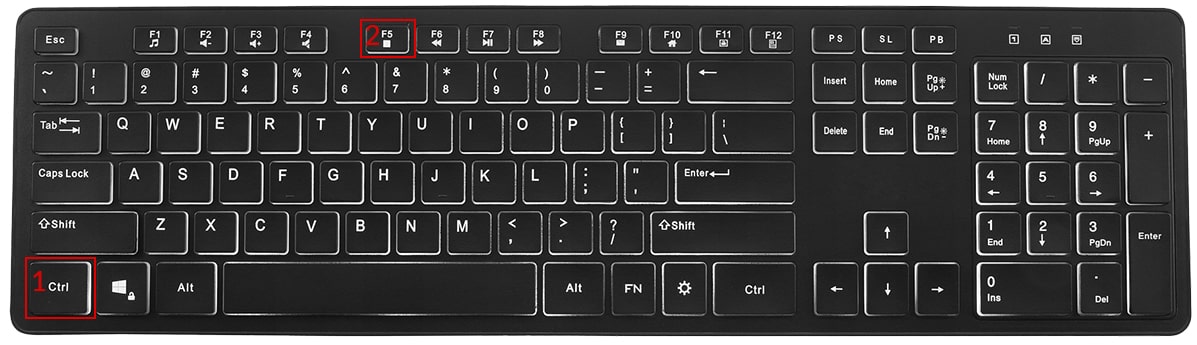
Hold down the key Ctrl, then press the key F5 Repeat this action at least 3 times
If this option does not work, try:
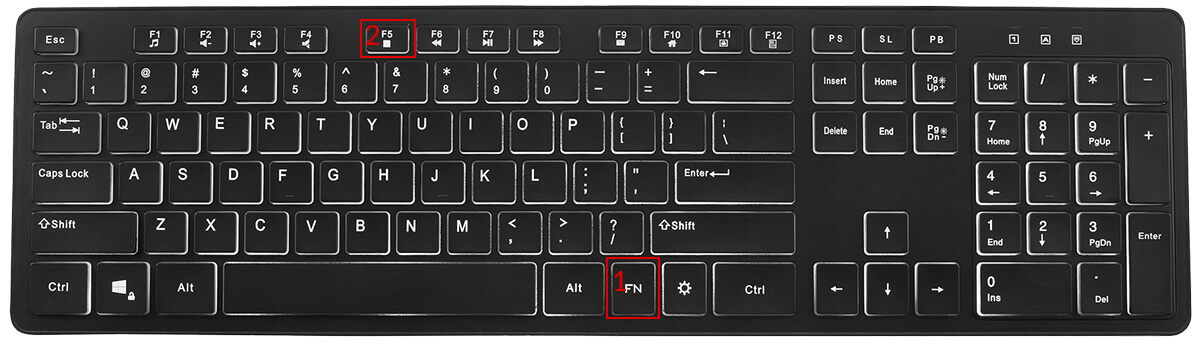
Hold down the key Fn, then press the key F5
Repeat this action at least 3 times
IN THE OPERATING SYSTEM:

For the Safari browser:
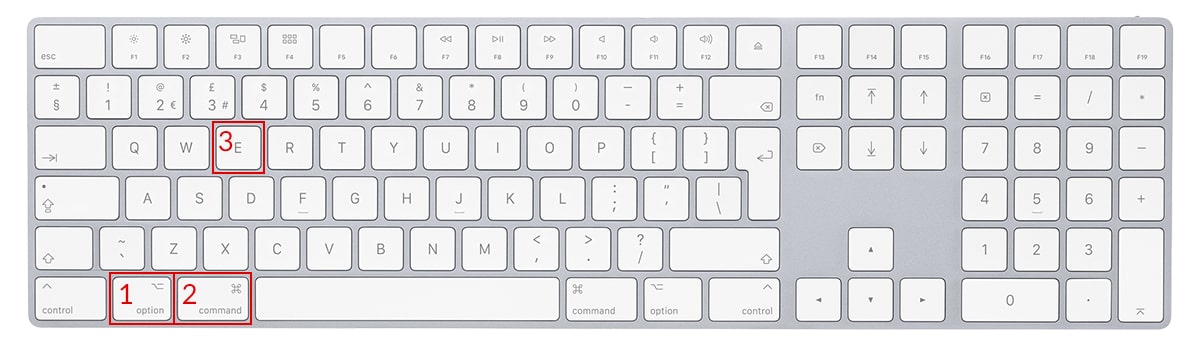
Hold down the key Option + Cmd(Command), then press the key E Repeat this action at least 3 times
For the Chrome, Firefox, Opera, Edge browser:
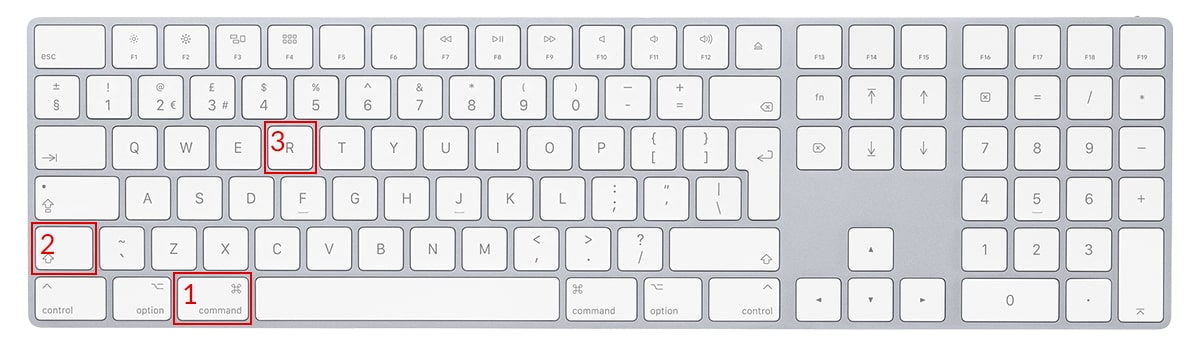
Hold down the key Cmd(Command) + Shift, then press the key R Repeat this action at least 3 times
The afaktury.pl invoicing application offers a goods transfer protocol template. This document is not an accounting document; it confirms that goods have been issued. It is often attached to an invoice. The protocol does not have to contain prices—only the product name and quantity.
Goods transfer protocols are often used by wholesalers to show which goods were issued to a customer. They also indicate which products have left inventory.
Although a goods transfer protocol is not an accounting document, it should include the seller’s and buyer’s (recipient’s) details, such as:
- document number
- date of issue and delivery of the goods
- company names
- addresses
- optionally, telephone numbers and e-mail addresses
It is also important to indicate which goods were issued and in what quantity. A price may also be entered on the form, although it is not required.
The goods transfer protocol template also provides space for the order number, delivery address, signatures of the issuer and recipient, and additional notes relevant to fulfilling the order.
A goods transfer protocol is issued together with the goods delivered to the customer.
It confirms that the customer received the goods, providing evidence that the goods left the warehouse. An invoice can be issued on this basis.
The afaktury.pl application lets you quickly convert a protocol into another document. A goods transfer protocol can be converted into an invoice with one click.
This option is available in two places. When editing a document, use the “Additionally create from this document” list near the dates to select an invoice, proforma invoice, bill, order, or advance invoice.
You can also convert a protocol from the list of saved protocols. The P, FV, ZAL, ZAM and R icons below the document number convert it into a proforma invoice, invoice, advance invoice, order or bill.
All data, including the products and prices, is transferred to the new document. The selected document opens automatically with the current numbering and date. Its fully editable contents can be reviewed, changed, saved, exported to PDF, or sent by e-mail.
After saving the protocol, you can create a PDF document.
Open the menu or the list of saved protocols and click Print or Create PDF. In the dialog, you can choose which information appears in the document, including:
- prices on the printout
- signatures
- QR code
- payment due date
- date in the payment term
- payment QR code
- document status
- GTU field
- sales procedure field
- quantity summary
- amount in words
- net amount in the currency and VAT amount in PLN
- P (receipt) field
- product status field (printout)
- delivery method
- amount in two currencies
- currencies
- bank accounts
- VAT-payer status
- EU VAT-payer status
- split payment
- payment display
- payment history display
A goods transfer protocol PDF does not require all these options, but it is useful to review them and select the relevant ones.
Click Create PDF to open the protocol, which can then be saved to your computer or printed.
The fastest way to deliver a goods transfer protocol is to e-mail it directly to the customer. In afaktury.pl, it can be sent from the document editor or the list of saved protocols. Clicking “Send” opens a window for entering the e-mail address and displays the message the customer will receive. You can edit the suggested message and add other information.
Before sending, select any additional options and information that may be useful or required.
The goods transfer protocol can also be translated into a foreign language.
After clicking Send PDF, the protocol is delivered as an attachment.
The afaktury.pl online document application, including its goods transfer protocol feature, offers many options that help manage company records. Preferred or frequently used parameters—such as the VAT rate, unit of measure, currency, notes, statuses and additional information—can be configured individually. Each document also has several PDF templates, allowing you to choose, for example, your preferred document color.
A company logo or graphic footer can be uploaded in Settings and then displayed automatically in the protocol PDF as part of the company’s visual identity.
Users of the invoicing application receive numerous document templates, modern features and easy access to the complete archive.