Sales to KSeF
Send sales invoices to KSeF quickly and accurately.
- Send individually or automatically
- Delayed sending and drafts
- Sending statuses, UPO and KSeF number

IN THE OPERATING SYSTEM:

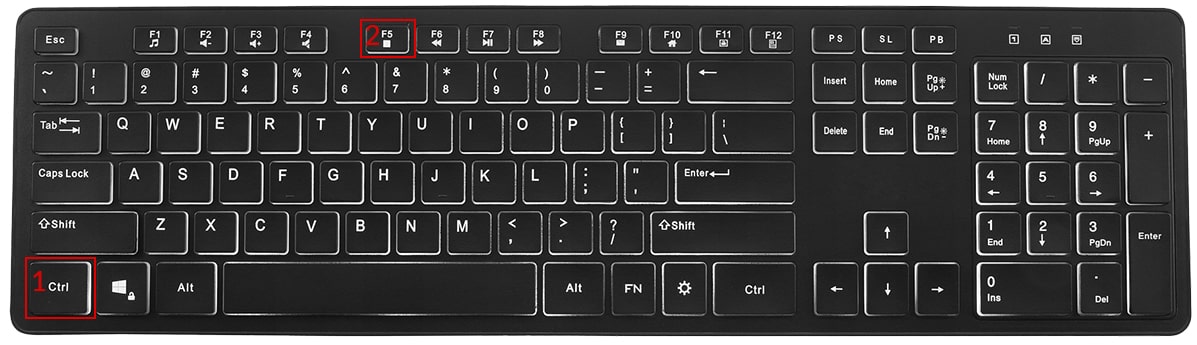
Hold down the key Ctrl, then press the key F5 Repeat this action at least 3 times
If this option does not work, try:
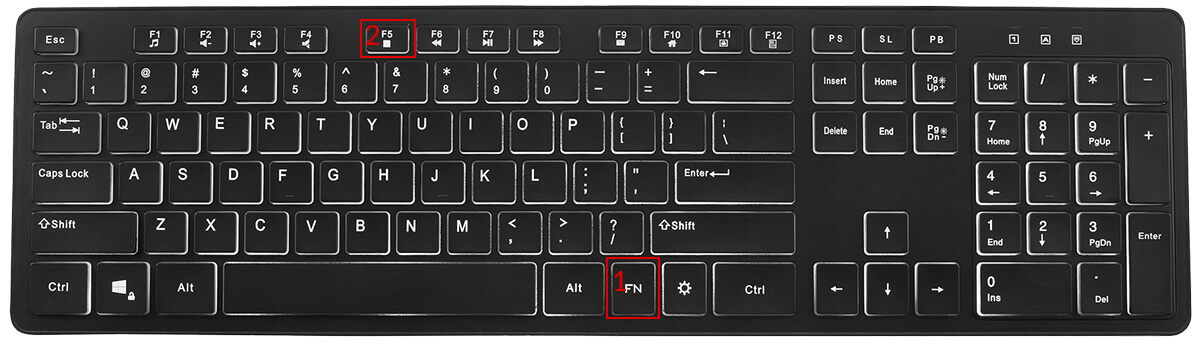
Hold down the key Fn, then press the key F5
Repeat this action at least 3 times
IN THE OPERATING SYSTEM:

For the Safari browser:
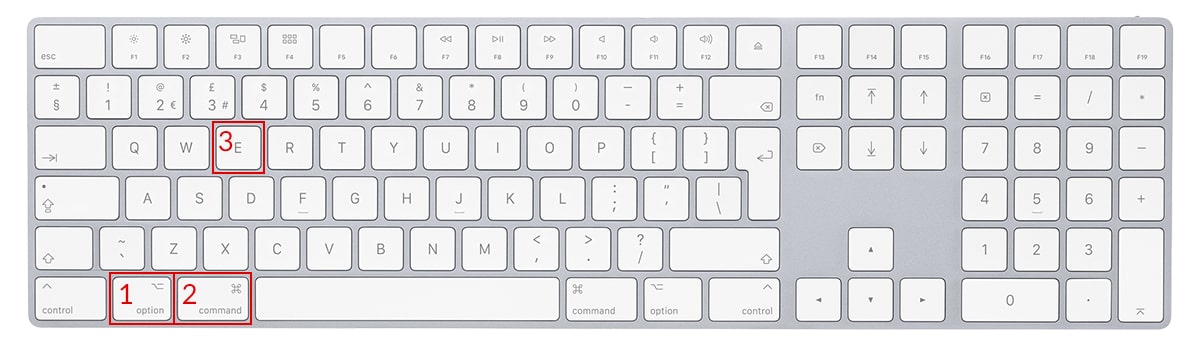
Hold down the key Option + Cmd(Command), then press the key E Repeat this action at least 3 times
For the Chrome, Firefox, Opera, Edge browser:
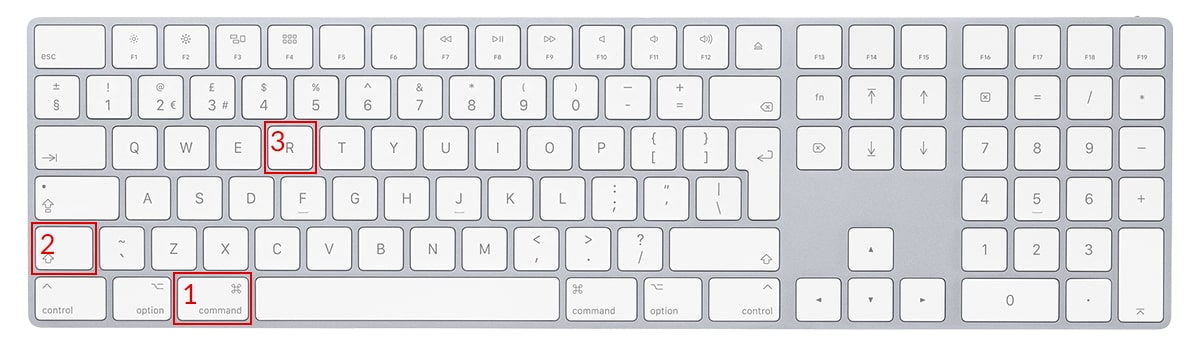
Hold down the key Cmd(Command) + Shift, then press the key R Repeat this action at least 3 times
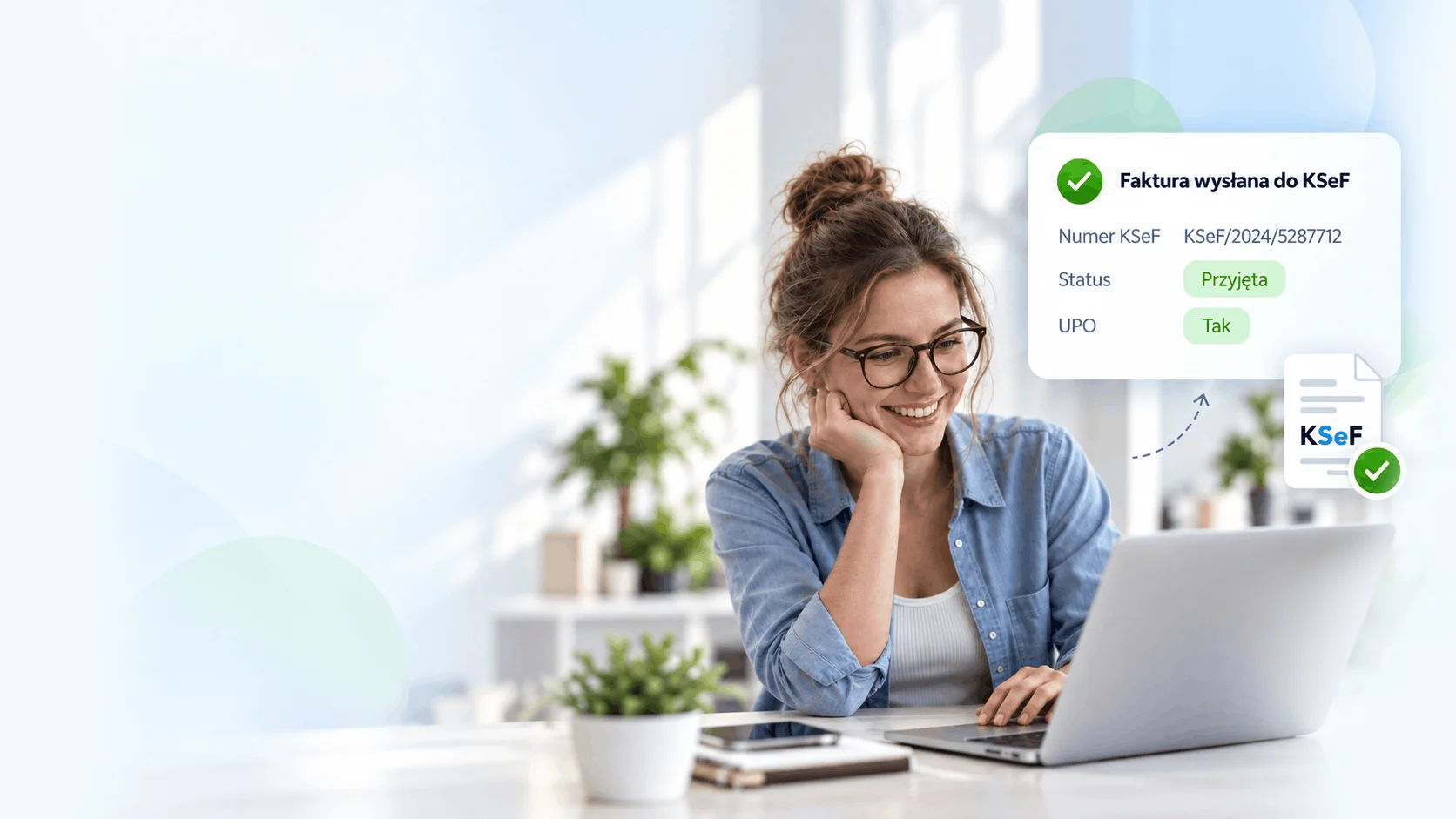
Send and download KSeF documents automatically
Send sales invoices to KSeF quickly and accurately.
Automatically download purchase invoices from KSeF and keep them handy.
Everything you need to manage KSeF comfortably in your invoicing software.
Send sales invoices and download purchase invoices in one place.
Automate sending and downloading to save time and keep working.
Purchase invoices from KSeF arrive in your account automatically.
Prepare your invoice today and send it to KSeF at a convenient time.
Check sending status, download UPO and view the KSeF number.
Convenient KSeF management for multiple companies and accounting offices.
Enable KSeF in a few simple steps and take control of your documents.
Set up KSeF access in a few minutes.
Send sales invoices and automatically download purchase invoices from KSeF.
Check statuses, download UPO and use the KSeF number in your software.
Automate document sending and downloading and save time every day.
Automatically sends invoices to KSeF according to your settings.
Automatically retries sending when errors occur.
Checks statuses and reports results.
Thousands of companies trust afaktury.pl. Now enjoy convenient KSeF access too.
Quick setup and clear instructions.
Invoicing, KSeF, purchases and reports in one application.
We help at every stage, from setup to everyday work.
Fits your workflow, simply and without unnecessary formalities.
Find answers to key questions about KSeF in afaktury.pl.
Yes. After configuring KSeF access, purchase invoices can be automatically downloaded to your afaktury.pl account.
Yes. Send a prepared invoice to KSeF or set up automatic sending, including a delay to review the document.
Yes. Check the sending status and KSeF number in the software. After acceptance, you can also download UPO.
No. Create invoices as usual and the software prepares them for KSeF. Instructions and our support team help with setup.
Automate sending and downloading, keep everything in one place and enjoy peace of mind.
See step by step how to connect afaktury.pl with KSeF. The whole video takes less than 4 minutes.
The National e-Invoice System (KSeF) is a modern ICT platform created by the Ministry of Finance to fully centralise and digitalise the invoicing process in Poland. From 2026, it will become mandatory for all businesses.
With KSeF, instead of being sent individually to a customer by email or post, each invoice first goes to the central system, where it receives a unique number and is made available to the recipient.
The system integrates invoicing applications (such as afaktury.pl) with the central database of the Ministry of Finance. Businesses can therefore continue to issue invoices in a familiar environment, while also being assured that the document complies with regulations and is automatically saved in KSeF.
Issuing an invoice in KSeF is not significantly different from the traditional process. After a document is created in afaktury.pl, the invoice is converted into the format required by KSeF and submitted to the system. There it receives an individual number which proves that it has been registered correctly.
The recipient can download the document directly from KSeF or receive it as before, as a PDF or printout. This number guarantees that the invoice is in the central register and meets legal requirements.
KSeF also introduces permission management: the business decides who in the company may issue or download invoices. This is an important security measure, as it eliminates the risk of unauthorised access to documents.
Yes. The National e-Invoice System will become mandatory for everyone, but it is being introduced in stages so that companies can prepare for the changes.
According to the latest announcements from the Ministry of Finance, the obligation is scheduled as follows:
* from 1 February 2026 - KSeF will cover the largest companies, whose sales in 2025 (including VAT) exceed PLN 200 million. For these companies, this will mean a complete transition to structured invoices in KSeF.
* from 1 April 2026 - the system will become mandatory for all other taxpayers, including businesses exempt from VAT (both by entity and by activity). In practice, this will include sole traders as well as small service and retail companies.
* from 1 January 2027 - the smallest entities described as „digitally excluded”, whose sales do not exceed PLN 10,000 per month and which do not have permanent internet access, will join the system.
It is worth noting that during the transition period until the end of 2026 paper invoices and invoices issued using cash registers will still be permitted. Providing a KSeF number on bank transfers will not be required either, and tax authorities will not impose penalties for minor errors related to electronic invoicing. This is a time when businesses can test the system and implement it step by step.
However, many business owners choose to start using KSeF voluntarily at an earlier stage. This lets them learn the new procedure in practice, learn how to use the system and see how KSeF affects cooperation with their accountants. This approach provides peace of mind, because the company will not have to face a completely new tool when the obligation takes effect.
In this context, afaktury.pl provides invaluable support. Our invoicing application is already fully adapted to KSeF requirements, so businesses do not have to worry about updates, new logical structures or technical announcements from the Ministry of Finance. They issue invoices as before, while the application automatically ensures compliance with current regulations and sends documents to the system. If regulations change or a new invoice structure is introduced, we update afaktury.pl on our side. Businesses do not have to configure anything or learn new procedures themselves. Afaktury.pl acts as a „translator” between the company and KSeF: everything happens in the background and the user sees only a simple, intuitive invoicing process.
Yes. The system uses data encryption, electronic certificates, audit mechanisms and archiving. Only authorised persons have access to invoices, and every operation is recorded. This level of security cannot be provided by traditional paper documents or emails with attachments.
For many businesses, KSeF is associated with additional obligations and concerns that any mistake or system failure will bring the company to a standstill. In reality, when using afaktury.pl, these problems are no longer your concern.
If KSeF is unavailable, you do not need to worry. You issue an invoice as usual, and our invoicing application queues it and automatically sends it to the system as soon as the failure is resolved. You do not waste time monitoring Ministry announcements or wondering whether an invoice „arrived”; you can simply be sure that it will be delivered. You focus on your business while we take care of the technical details.
Even receipt-based sales are simple. If a customer asks for an invoice for a receipt, you can convert the document with one click in this invoicing application and send it to KSeF. Everything runs smoothly and in compliance with the law.
To begin, at the top of this page you will find an instructional video showing the entire process „live”: how to integrate an invoicing application with KSeF. If you prefer visual learning, scroll up and watch the video**, then return to the steps below to complete them yourself.
Step 1: Prepare access to KSeF.
If you issue invoices on behalf of a company, make sure you have the appropriate permissions in KSeF (in the Taxpayer Application). Generate an authorisation token for integration with afaktury.pl. This is a secure „key” that enables the system to send your invoices to KSeF.
Step 2: Connect the invoicing application to KSeF.
In afaktury.pl, go to Settings → KSeF and paste the token. Save the settings. From now on, your invoices can be sent to KSeF automatically without any additional action.
Step 3: Decide when invoices should be sent.
You have two options: immediately (after saving the invoice) or with a delay (e.g. 2, 10 or 30 minutes, 1-2 hours, or „at the end of the day”). A delay gives you a comfortable buffer for checking the data. It is very practical: you issue the document, calmly check it again, and the invoicing application sends it automatically at the set time.
Step 4: Issue the invoice as usual.
Enter the customer's details, items, rates and dates, exactly as before. You do not need to know any technical KSeF requirements: the application prepares and validates the structure „behind the scenes”.
Step 5: Save the invoice and send it to KSeF.
After you save the document, afaktury.pl sends it to KSeF according to your settings (immediately or at the scheduled time). You do not have to submit anything manually: afaktury.pl handles the connection, security and confirmations.
In afaktury.pl, you can see the status of every invoice (in the document list and invoice details). This lets you determine in seconds whether an invoice has been delivered to KSeF. It is the most convenient part of the process: instead of guessing, you simply check the status and know immediately.
No. The application was designed so that every user, even without computer knowledge, can issue invoices easily. You create a document as usual, and the system ensures that it meets KSeF requirements. You can also use delayed submission to verify the data before final delivery.
Afaktury.pl also offers technical support, training materials and an intuitive interface, making the transition to KSeF easier than it may seem.
If anything concerns you or you simply want to go through the process of integrating the invoicing application with KSeF together with us, call us. We work every day during standard business hours (details and the number can be found in the footer and in the „Contact” section). We will guide you through everything over the phone, step by step: from generating and pasting the token and configuring delayed submission to interpreting statuses.
Prefer to write? Use the „Submit feedback” window, briefly describe the situation, and we will call or write back as soon as possible. We will ask questions, check the issue and help configure everything so that it works automatically and without stress. Even when KSeF has a technical outage, your invoices are safely queued and sent automatically after it ends. You do not monitor announcements; we take care of the rest.
That is why businesses choose us. Afaktury.pl is not only a reliable invoicing application that handles KSeF, statuses and the queue during outages by itself. It is also a team of people who answer calls, call back, explain everything clearly and guide you through the process step by step.
The simplest and truly stress-free route to KSeF is simply to register with afaktury.pl. You create an account in minutes, paste the token and issue documents as usual; the application handles everything else (submission to KSeF, statuses, the KSeF number and the queue during an outage). It is an affordable tool that delivers a major transformation in invoicing. Start today, test all its capabilities and see how quickly KSeF stops being a challenge and simply becomes part of a smoothly running process.
One simple tool lets you manage the entire sales workflow: issue various document types (invoice, correction, pro forma, bill), send PDFs to customers, monitor payments, view document history and customer and product records, and create summaries and basic reports for everyday control. If you sell through marketplaces, you can integrate systems using an API key, and everything works seamlessly with KSeF.
With afaktury.pl, you receive 30 days of the full version of the invoicing application for free.
You can test KSeF in afaktury completely free of charge.
To do so
More than 100,000 companies have chosen afaktury.pl as their invoicing partner.
The trust of so many businesses speaks for itself.
Flexibility, security and modern technology in one place. Join the industry leaders and transform the way you run your business.
We are ready to help take your company to the next level!